Migration from Vimba#
General tips#
To enable easy migration, Vimba and Vimba X are very similar. Changes were mainly made to achieve CenICam-compliance, usage with cameras from all manufacturers, and to prepare future camera features. Only VmbNET is a completely new API.
Note
Vimba X is not backward compatible with previous Vimba versions.
High-level changes#
General SDK changes:
API name: VmbC (instead of VimbaC)
Structs: Some members have changed, some renamings, new structs for new GenTL modules
Header files, includes: Paths and some file names changed, see the examples
The transport layer enums now comply with GenICam. For details, see TL enumerations
API name: VmbCPP (instead of VimbaCPP)
Namespace: VmbCPP (instead of AVT::VmbAPI)
VmbSystem: replaces VimbaSystem
Entry point: VmbSystem singleton
Classes: Some members have changed, some renamings, new classes for advanced configuration
Header files, includes: Paths and some file names changed, see the example
The transport layer enums now comply with GenICam. For details, see TL enumerations
Shared pointers: Usage of template functions instead of macros, see Shared pointers.
VmbNET is a completely different API than VimbaNET.
You cannot reuse code from Vimba.
API name: VmbPy (instead of VimbaPython)
Installation: VmbPy is available as a .whl file, see Python API Manual.
Importing: via
import vmbpy(instead of import vimba)VmbSystem: replaces the Vimba singleton class
Classes: Some members have changed, some renamings, new classes for advanced configuration
Frame.convert_pixel_formatwas changed (see convert_pixel_format.py example).In the examples, the vimba variable was renamed to vmb.
Function-related changes:
Feature access of Camera, Stream, and Local Device is no longer merged. Access via GenTL modules (see graphics below) is now possible.
C and C++: New Convenience function
VmbPayloadSizeGet()for correct buffer allocationSave/load settings allows to differentiate between GenTL modules
Chunk (GenICam-compliant implementation) replaces AncillaryData
Image Transform:
VmbGetVersion()was renamed toVmbGetImageTransformVersion().VmbSetImageInfoFromPixelFormat(): removed paramaterStringLength.
Examples:
Deinstalling Vimba X always deletes the includes examples, even if you have changed them. To preserve your changes, save the examples to a different location before deinstalling Vimba X.
For details about the examples, see Examples Overview.
GigE cameras:
By default, Broadcast is enabled (instead of Discovery Once).
Access Mode Config is not available - please use the VmbC PersistentIp example to change camera’s IP address permanently.
Transport layers:
Changed display name (AVT instead of Vimba) to ease distinguishing them from the TLs included in Vimba.
Higher required version:
Visual Studio: Example solutions and release builds require VS 2017 or higher
C++ version: The C++ API is compatible with C++ 11 and higher
NEW: Vimba X features are now accessible in a GenICam-compliant way through GenTL modules:
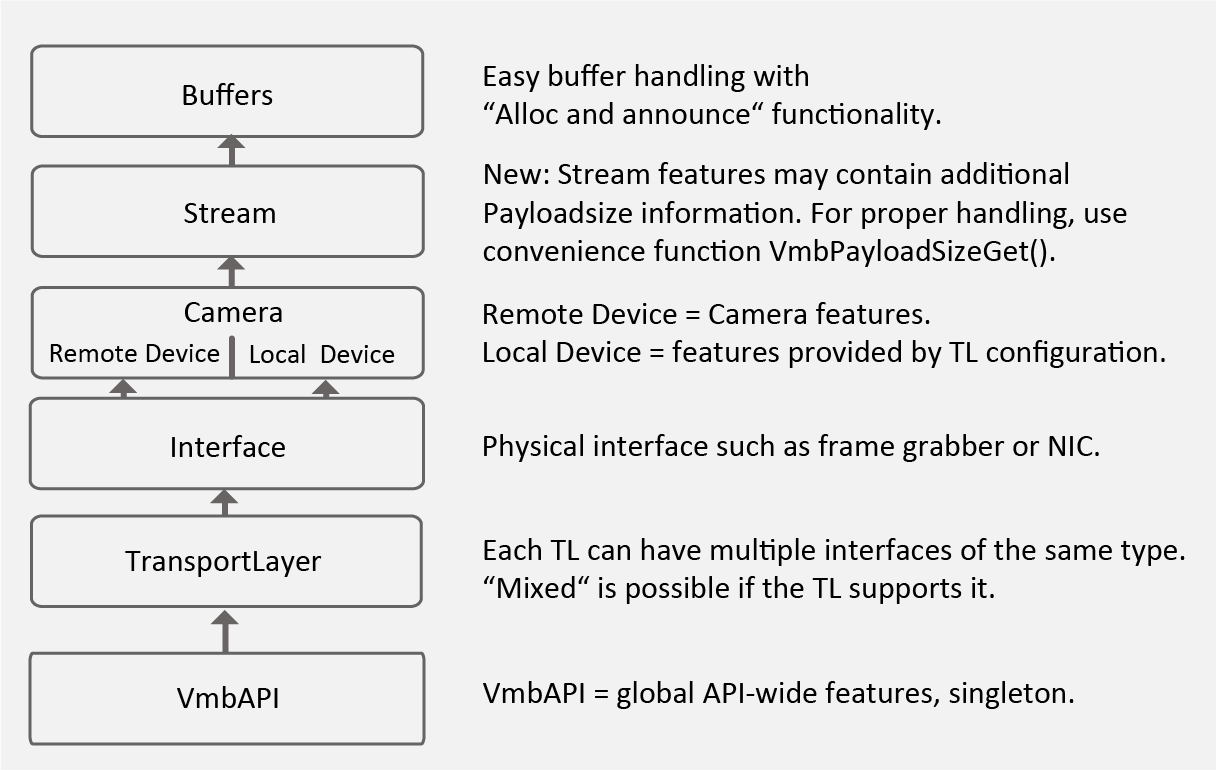
Vimba X GenTL modules#
Vimba merges features of the Camera, Stream, and Local Device - they are all accessible via Camera.
Vimba X separates these features in a GenICam-compliant way as GenTL modules, so that you can access and control features even if they have the same name (such as Width on the camera and the frame grabber). As a consequence, the Camera handle only accesses camera features, which is sufficient for many applications.
Note
Accessing the Local Device is only necessary for advanced configuration. To access it, the camera must be open.
Note
The first stream is opened implicitly by opening the camera object. You don’t need to work with Stream to acquire images.
To enable advanced configuration, the settings of the frame grabber or TL features can now be accessed directly through the TransportLayer module ( named “System” in the official GenICam standard).
Using Vimba X functions#
Tip
The following sections guide you through signficant function changes.
Previous Vimba System functions#
Compared to Vimba, some previous “Vimba System” functions are now available as functions of the TransportLayer module:
GigE camera discovery features, including Force IP
Discovery Events
Action Commands
Startup, Open, Close#
The Vimba X API initialization opens the Camera module and additionally the TransportLayer and Interface modules. The corresponding handles are valid throughout a session.
The following changes apply to Vimba X Startup, Open, and Close functions.
See also
If your TL or camera is not found or if you experience other issues, see Troubleshooting.
Function |
Comment |
|---|---|
VmbStartup() |
Extended - optional parameter to control TL usage. |
VmbCameraOpen() |
Modified - camera handle only provides access |
VmbCameraClose() |
Modified - blocks until capture ended and all callbacks |
VmbInterfaceOpen() |
Removed - interface handle is directly available |
VmbInterfaceClose() |
Removed - interface handle is directly available |
VmbShutdown() |
Modified - waits until frame callbacks are completed |
VmbTransportLayersList() |
New - for querying the new struct VmbTransportLayerInfo_t |
VmbFeatureListAffected() |
Removed - not part of the GenICam standard |
The VmbStartup() function was extended with an optional parameter. By default, the parameter is NULL.
You can change it to use TLs from third-party vendors.
See also
See the SDK Manual, chapter TL activation and deactivation.
To quickly learn how to access features of the GenTL modules, see the ListFeatures example. Details and more possibilities are listed in the API manual.
Function |
Comment |
|---|---|
VmbSystem::Startup() |
Opens camera, TL, and interface modules. Optional |
Camera::Open() |
Modified - camera handle only provides access |
Camera::Close() |
Modified - blocks until capture ended and all callbacks |
Interface::Open() |
Removed - API startup opens interfaces |
VmbSystem::OpenInterfaceByID() |
Removed - API startup opens interfaces |
Interface::Closed() |
Removed - API shutdown closes interfaces |
VmbSystem::Shutdown() |
Modified - waits until frame callbacks are completed |
Interface::GetPermittedAccess() |
Removed - contained in API startup |
BaseFeature::GetAffectedFeatures() |
Removed - not part of the GenICam standard |
The function VmbSystem::Startup() is overloaded to control TL usage.
You can change it to use TLs from third-party vendors.
See also
See the SDK Manual, chapter TL activation and deactivation.
Function |
Comment |
|---|---|
set_path_configuration() |
New - method to set optional paramater for |
VmbSystem.get_all_transport_layers |
New - enumerates TLs (only required for |
VmbSystem.get_transport_layer_by_id() |
New - only required for advanced configuration |
VmbSystem.get_interface_by_id() |
New - only required for advanced configuration |
VmbSystem.set_network_discovery() |
Removed - functionality via GigE TL |
Query features and camera info#
New features are available to query the valid value set of features and to query the camera info by handle.
Function |
Comment |
|---|---|
VmbFeatureIntValidValueSetQuery() |
New: Query the valid value set of an |
VmbCameraInfoQueryByHandle() |
New: Query the camera info given a local or |
The new function feature::GetValidValueSet(Int64Vector& validValues)
delivers the valid value set of an integer feature. Calling this function from the feature object
of another type delivers VmbErrorWrongType. If some integer feature does not support valid value set,
the error VmbErrorValidValueSetNotPresent is returned.
Function |
Comment |
|---|---|
get_features_affected_by() |
Removed - not part of the GenICam standard |
has_affected_features() |
Removed - not part of the GenICam standard |
Using the GenTL modules#
In contrast to Vimba, the retrieved Camera handle accesses camera features only. To access features of the other GenTL modules, several options are available.
In many cases, it is practical to use:
C API: Members of the *info structs, especially Struct VmbCameraInfo_t.
C++ API: Members of the camera class
Python API: Members of the camera class
For easy access to the GenTL modules, their handles are added to the *info structs:
New: Struct VmbTransportLayerInfo_t, which can be queried with the new function
VmbTransportLayersList().Modified: See Struct VmbCameraInfo_t and Struct VmbInterfaceInfo_t. Member functions that are now redundant were removed. Handles to all related GenTL modules were added.
Listing the GenTL modules
The VmbGenTLSystemsList() function is new. It replaces VmbInterfacesList().
The C++ API contains additional class member functions and convenience functions.
Note
For image acquisition, you can continue using the Camera class. The Stream module is required only to access data such as statistics of GigE cameras and for multiple streams.
The following additional class member functions have been added:
- class VmbSystem
GetInterfacesByTL()
GetCamerasByTL()
GetCamerasByInterface()
GetTransportLayers()
GetTransportLayerByID()
- class Camera
GetInterface()
GetTransportLayer()
GetStreams() (not needed for cameras with one stream)
GetLocalDevice()
GetInterfaceByID()
GetTransportLayer() (LocalDevice, camera must be open)
GetStreams() (not needed, implemented for future use)
GetLocalDevice()(camera must be open)
GetExtendedID()
- class Frame
AccessChunkData()
- class Interface
GetCameras()
GetTransportLayer()
- class TransportLayer
TransportLayer()
GetInterfaces()
GetCameras()
GetID()
GetName()
GetModelName()
GetVendor()
GetVersion()
GetPath()
GetType()
For an overview, see C++ API diagram.
The Python API contains additional class member functions and convenience functions.
Note
For image acquisition, you can continue using the Camera class. The Stream module is required only to access data such as statistics of GigE cameras and for multiple streams.
The following additional class member functions have been added:
- class VmbSystem
get_interfaces_by_tl()
get_cameras_by_tl()
get_cameras_by_interface()
get_transport_layers()
get_transport_layer_by_id()
- class Camera
get_interface()
get_transport_layer()
get_streams() (not needed for cameras with one stream)
get_local_device()
get_interface_by_id()
get_transport_layer() (LocalDevice, camera must be open)
get_streams()
get_extended_id()
- class Frame
access_chunk_data()
- class Interface
get_cameras()
get_transport_layer()
- class TransportLayer
get_interfaces()
get_cameras()
get_id()
get_name()
get_model_name()
get_vendor()
get_version()
get_path()
get_type()
Image acquisition#
New convenience function
C and C++ only: Vimba X contains the new convenience function VmbPayloadSizeGet().
Please use it to apply correct buffer allocation.
If the transport layer’s stream module provides a payload size, this has priority over the payload size of the camera. In Vimba, this behavior is hidden from the user and the camera’s payload size is overwritten by the payload size of the stream.
Frame announce and frame revoke
The function
VmbFrameAnnounce()was changed. It can be called during acquisition to add more frames (if supported by the TL).
The function VmbFrameRevoke() was changed:
Frames can be revoked during acquisition if they are currently not queued or currently in use in a pending frame callback.
Frame buffers which are allocated by the TL are deleted by the TL.
The call reports an error after
VmbCaptureQueueFlush()if the frame is still in use by a currently executed callback.
Capture start
The function VmbCaptureStart() was changed.
The call discards all pending frame callbacks.
Only the currently running callback is completed.
Capture end
The function VmbCaptureEnd() was changed:
Only the first call for a certain frame waits. All other parallel calls that try to wait for the same frame return an error (no multithreaded wait for the same frame). If a callback is executed when capture is stopped, this function does not return until the callback returns.
Capture frame wait
The function VmbCaptureFrameWait() was changed.
Only the first call for a certain frame waits. All other parallel calls
that try to wait for the same frame return an error (no multithreaded
wait for the same frame).
Frame callback
The frame callback needs the additional argument const VmbHandle_t streamHandle.
For details, see the AsynchronousGrab example.
Image size
In struct VmbFrame_t, entry VmbUint32_t imageSize was removed.
Payload type
The function GetPayloadType() is new.
Frame announce and frame revoke
The function
AnnounceFrame()was changed. It can be called during acquisition to add more frames (if supported by the TL).
The function RevokeFrame() was changed:
Frames can be revoked during acquisition if they are currently not queued or currently in use in a pending frame callback.
Frame buffers which are allocated by the TL are deleted by the TL.
The call reports an error after
FlushQueue()if the frame is still in use by a currently executed callback.
Capture start
The function StartCapture() was changed.
The call discards all pending frame callbacks.
Only the currently running callback is completed.
Capture end
The function Camera::EndCapture() was changed:
Only the first call for a certain frame waits. All other parallel calls that try to wait for the same frame return an error (no multithreaded wait for the same frame). If a callback is executed when capture is stopped, this function does not return until the callback returns. Capture frame wait
The function VmbCaptureFrameWait()
is only used in Camera::AcquireSingleImage().
Stream buffer alignment
New convenience function to query the required buffer alignment
from the Stream module: GetStreamBufferAlignment
Image size
The function Frame::GetImageSize() was removed.
Payload type
The function GetPayloadType() is new.
The method
get_image_size()was removed.The frame handler additionally contains
stream: Stream. Camera and frame within the frame handler are unchanged.New method:
Camera.get_frame_with_context.Method
Camera.get_frame_generatorchanged behavior: Frames generated with this method cannot be used outside of the loop. To enable frame usage outside of the loop, copy them.
Chunk replaces AncillaryData#
The function VmbChunkDataAccess() is new. It replaces functions
for “AncillaryData”. In contrast to VmbAncillaryDataOpen(), no
ancillary data handle is returned. To access Chunk data, use VmbChunkAccessCallback.
For details, see the C API manual, section Chunk.
Function |
Comment |
|---|---|
VmbAncillaryDataOpen() |
Removed - replaced by VmbChunkDataParse() |
VmbAncillaryDataClose() |
Removed - replaced by VmbChunkDataParse() |
VmbChunkDataAccess() |
New - replaces VmbAncillaryDataOpen() and |
The AncillaryData class was removed. To access chunk, use Frame::AccessChunkData(),
calling it from FrameObserver::FrameReceived() as shown in the ChunkAccess example.
Function |
Comment |
|---|---|
Frame::GetAncillaryData() |
Removed |
Frame::GetAncillarySize() |
Removed |
Frame::AccessChunkData |
New |
Function |
Comment |
|---|---|
frame.get_ancillary_data() |
Removed |
frame.get_ancillary_size() |
Removed |
frame.access_chunk_data() |
New |
Loading and saving settings#
Vimba X enables you to load and save settings of the GenTL module of your choice or even of the whole system configuration including camera and TL settings. Therefore, you cannot reuse settings that you have saved with Vimba. Details are described in the API manuals.
Vmb API Events#
Events as an API feature are now implemented and named in a GenICam-compliant way, the table below provides some examples of renamed functions.
The events inform changes of the camera list or the interface list.
Feature |
Comment |
|---|---|
EventCameraDiscovery |
Renamed DiscoveryCameraEvent |
EventInterfaceDiscovery |
Renamed DiscoveryInterfaceEvent |
Feature |
Comment |
|---|---|
EventCameraDiscovery |
New feature |
EventInterfaceDiscovery |
New feature |
See changed event names in tab C.
Registers Read/Write#
Functions for reading and writing registers were removed.